How to Use the Shareholder’s Benefit Discount
Please check the rules regarding the Shareholder’s Benefit Discount Fare on the Details on Fares page.
- To use the Shareholder’s Benefit Discount Fare, you must register your shareholder’s benefit number and registration password when paying.
- You can use one shareholder’s benefit number for one one-way flight per person.
You can only board within the validity period of the shareholder’s benefit number included in the shareholder’s benefit number notification document. - If you purchase a ticket that includes two or more flights (a non-direct flight), you will need a shareholder’s benefit number with an identical validity period for the extra flights.
- Cannot be used in conjunction with other discount fares.
- Due to improvements to the passenger service system for Japan domestic flights, flights prior to May 18, 2026 and from May 19, 2026 onward will have partially different procedures.
You cannot make a reservation that includes both flights prior to May 18, 2026 and from May 19, 2026 onward. Please reserve these flights separately.
- Cautions When Using the “Shareholder’s Benefit Number Guide”
- How to Use the “Shareholder’s Benefit Number Guide”
Cautions When Using the “Shareholder’s Benefit Number Guide”
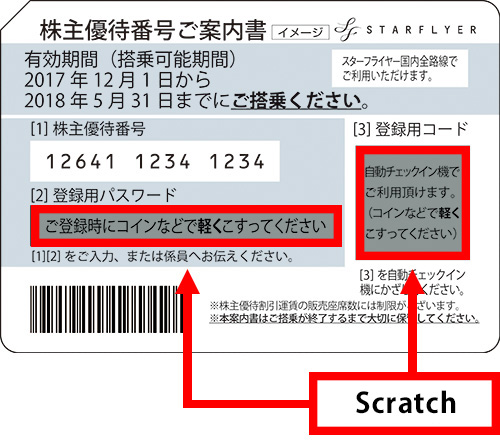
- The scratchable area should be gently scratched with a coin or something similar. Scratching it with too much force could erase the letters underneath.
- We will not collect your “Shareholder’s Benefit Number Guide”, so you should keep it somewhere safe even after registration, until you have finished boarding your flight.
- You cannot purchase the ticket at a travel agency if the reservation was made through the Star Flyer official website.
How to Use the “Shareholder’s Benefit Number Guide”
Boarding Procedure
Please reserve your flight by way of the Star Flyer official website, SF Call Center, airport counter, or a travel agency. After making your reservation, you will be able pay for it and register your shareholder’s benefit number and registration password, so please pay for it before the purchase deadline.
Step 1 Reservation and purchase
All tickets will go on sale at the same time for each flight schedule period.
- Applicable fares and periods tickets go on sale See
Qualifying Fares & Boarding Periods
Reservation / Sales Start Date Boarding Period Qualifying fares on sale Until Saturday, March 28, 2026All Japan domestic flight faresJanuary 29, 2026 (Thu) 01:00 pm (JST) Sunday, March 29, 2026 to Monday, May 18, 2026All Japan domestic flight faresReservations and Purchases
- * Please make sure to purchase your ticket within the specified purchase deadline when making your reservation. (If the purchase deadline has expired, the reservation will be canceled without notice.)
- * There are restrictions on the number of seats sold. You might not be able to specify a seat for some flights.
- * There are certain rules for cancellations and refunds for each fare. For more details, check Information on Ticket Refunds.
Please purchase your flight ticket within the purchase deadline. However, you must purchase it at least 20 minutes prior to the departure time.
- *
You cannot purchase the ticket at a travel agency if the reservation was made through the Star Flyer official website.
Please purchase your flight by way of the Star Flyer official website (credit card or convenience store payment,Pay-easy Payments at a Bank), SF Call Center, or check-in counter.
Step 2: Boarding
SKiP Service is available.
How to Use the Star Flyer Official Website
Purchases
You must register your shareholder’s benefit number and registration password on the ‘Payment Information Input Screen’.
- *
Please use one of the following payment methods when using the Star Flyer official website.
Credit card or convenience store payment,Pay-easy Payments at a Bank.
Registering the Shareholder’s Benefit Number and Registration Password
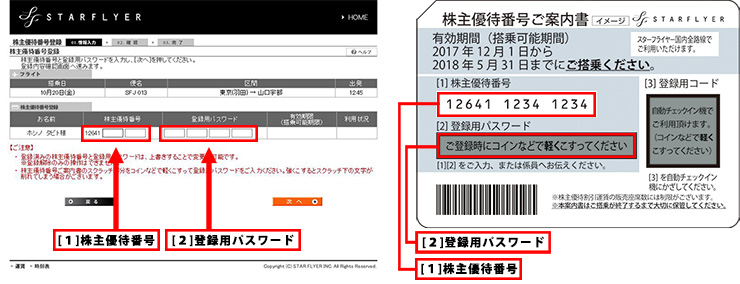
In addition to entering your payment information on the “Payment Information Input Screen”, please enter your (1) shareholder’s benefit number and (2) registration password from the shareholder’s benefit number notification document.
◆PC Website
Shareholder’s benefit number registration screen
◆Smartphone Website
Shareholder’s benefit number registration screen
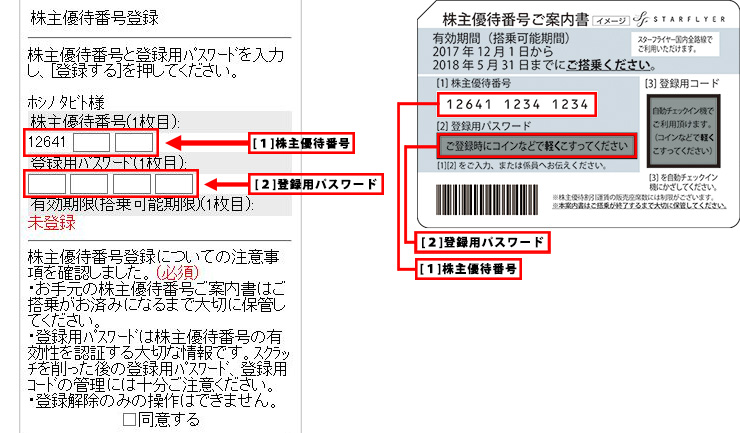
- *
The scratchable area should be gently scratched with a coin or something similar.
- *
Keep the “Shareholder’s Benefit Number Guide” somewhere safe even after registration, until you have finished boarding your flight.
Reservation Changes and Refunds
- Reservation Changes
The reserved flight can be changed up to the expiration date in the shareholder’s benefit number notification document.
To change your reservation to a date outside the validity period of your shareholder’s benefit number (outside the period in which you can board), please undertake the refund procedure, and then reserve and purchase a new flight with a shareholder’s benefit number that is valid on your new boarding date. A set transaction fee will be charged upon giving a refund.
If the new fare is different to the original fare because of the change in reservation, you will need to pay the difference.You cannot change the reserved flight at or after departure time.You cannot change the passenger.
You can change the reserved flight to one on the same route and with the same fare. - Refunds
We accept refunds within 30 days, as calculated from the day after the period of validity of the ticket ends.Refunds are subject to a set cancellation charge.
If claiming a refund after the shareholder’s benefit number has been registered, then the shareholder’s benefit number and registration password that were already registered can be reused as long as the shareholder’s benefit number hasn’t expired.