Standby and Waitlist at Airports
If your desired flight is fully booked, we accept seat waiting list applications at the airport on the day of departure.
How to Apply
Please complete check-in for your flight and follow the steps below to apply.
-
Step.1Apply to be on the seat waiting list
You can apply to be on the seat waiting list by using one of the following methods.
(1) Make a standby request online
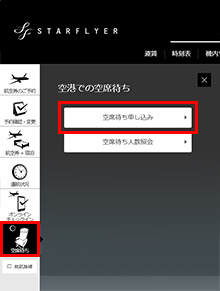
(2) Make a standby request at the airport counter
-
Step.2Passing the Security Checkpoint
-
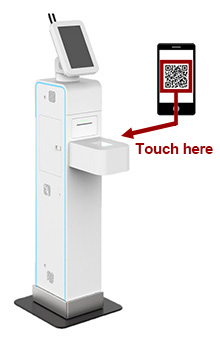
- ①
Make sure to check that it is your boarding pass.
- ②
Please tap your boarding pass for your reserved flight on the scanner.
- ③
Follow the guidance on the screen to pass through the gate.
The security checkpoint certificate previously issued at the security checkpoint is no longer used due to equipment upgrades.
Check your boarding pass details, such as your boarding gate, boarding group number, and seat number. - ①
-
Step.3Check In After Being Called
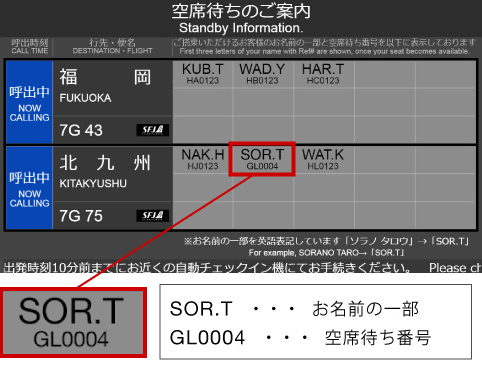
We will call you 20 minutes before the departure time, and so please wait at the designated calling area.
A part of the full name of the passenger for whom a seat has been made available and their seat waiting list number will be displayed on the digital signage display.
Check in online to issue your boarding pass.- ※
Even if a part of your full name and your seat waiting list number are displayed, you will not be able to board unless you check in.
- ※
If you have baggage to check in, please inform airport staff.
- ※
Order of Being Called
Passengers on the standby list will be called in the following order of priority.
Among passengers with the same priority status, the order in which they are called may vary depending on the fare class of the ticket for which they applied for standby and the order in which they applied.
- ※
Please note that we may give priority to calling passengers of canceled flights.

Star Link VEGA members

Star Link ALTAIR members
General passengers